Overview
This guide provides a step-by-step walkthrough for deploying a full-stack multimodal AI system on a single server equipped with 8x NVIDIA L20 GPUs. The stack includes LLM, VLM, Embedding/Reranker (RAG), ASR, Dify (LLM Orchestration Agent Platform), and MinerU (PDF Extraction).
VRAM Estimation for LLMs

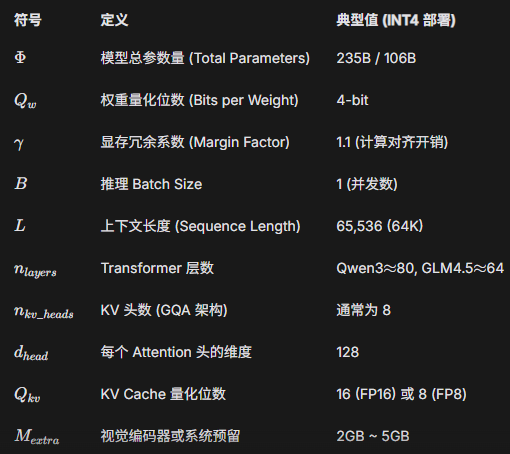
Key Strategy: Since Large Language Model (LLM) performance correlates more strongly with parameter scale (B) than with quantization levels, we prioritize models with higher parameter counts. For this deployment, we selected the int4 AWQ versions of Qwen3-235B and GLM-4.5V-106B to maximize overall intelligence and performance within the available VRAM.
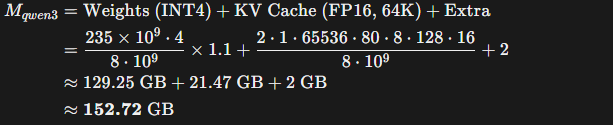
Estimated VRAM Occupancy for Qwen3-235B:
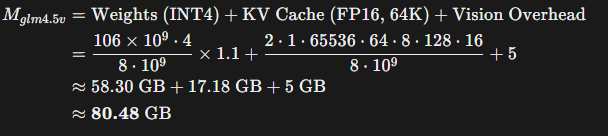
Estimated VRAM Occupancy for GLM-4.5V-106B:
Note: Models can be downloaded via HuggingFace or ModelScope.
1. Large Language Model (LLM)
Prerequisites: Docker installed, vLLM image (v0.11.0 or later), and Qwen3-235B-AWQ weights.
Deployment (Docker Compose):
version: '3'
services:
  qwen3-235b-instruct:
    image: vllm/vllm-openai:v0.11.0
    container_name: qwen3-235b-instruct
    deploy:
      resources:
        reservations:
          devices:
            - driver: nvidia
              capabilities: [gpu]
              device_ids: ['0','1','2','3'] # Dedicated 4 GPUs
    volumes:
      - /your/path/to/qwen3-235b-instruct-awq:/root/models
    ports:
      - "10000:8000"
    shm_size: '2g'
    command: >
      --model /root/models
      --host 0.0.0.0
      --port 8000
      --trust-remote-code
      --served-model-name LLM
      --gpu-memory-utilization 0.75
      --enable-auto-tool-choice
      --tool-call-parser hermes
      --max-model-len 65536
      --tensor-parallel-size 4
      --api-key your-api-key
2. Vision Language Model (VLM)
Prerequisites: Docker installed, vLLM image (v0.11.0+), and GLM-4.5V-106B-AWQ weights.
Deployment (Docker Compose):
version: '3'
services:
  glm-4.5v-106b:
    image: vllm/vllm-openai:v0.11.0
    container_name: glm-4.5v-106b
    deploy:
      resources:
        reservations:
          devices:
            - driver: nvidia
              capabilities: [gpu]
              device_ids: ['4', '5', '6', '7'] # Dedicated 4 GPUs
    command: >
      --model /root/models
      --host 0.0.0.0
      --port 8000
      --trust-remote-code
      --enable-auto-tool-choice
      --enable-expert-parallel
      --served-model-name VLM
      --tool-call-parser glm45
      --reasoning-parser glm45
      --gpu-memory-utilization 0.45
      --max-model-len 42000
      --tensor-parallel-size 4
      --api-key your-api-key
    volumes:
      - /your/path/to/glm-4.5v-awq:/root/models
    ports:
      - "10001:8000"
3. Embedding & Reranker (RAG)
These models are lightweight and can share GPU resources with other services.
  qwen3-4b-embedding:
    image: vllm/vllm-openai:v0.11.0
    container_name: qwen3-4b-embedding
    deploy:
      resources:
        reservations:
          devices:
            - driver: nvidia
              capabilities: [gpu]
              device_ids: ['4','5','6','7']
    volumes:
      - /your/path/to/qwen3-4b-embedding:/root/models
    ports:
      - "10004:8000"
    shm_size: '1g'
    command: >
      --model /root/models
      --host 0.0.0.0
      --port 8000
      --trust-remote-code
      --served-model-name EMBEDDING
      --gpu-memory-utilization 0.08
      --max-model-len 8192
      --tensor-parallel-size 4
      --api-key your-api-key

  qwen3-4b-reranker:
    image: vllm/vllm-openai:v0.11.0
    container_name: qwen3-4b-reranker
    deploy:
      resources:
        reservations:
          devices:
            - driver: nvidia
              capabilities: [gpu]
              device_ids: ['4','5','6','7']
    volumes:
      - /your/path/to/qwen3-4b-reranker:/root/models
    ports:
      - "10005:8000"
    shm_size: '1g'
    command: >
      --model /root/models
      --host 0.0.0.0
      --port 8000
      --trust-remote-code
      --served-model-name RERANKER
      --task score
      --gpu-memory-utilization 0.08
      --max-model-len 8192
      --tensor-parallel-size 4
      --api-key your-api-key
4. Dify (Orchestration Platform)
Clone the Dify Repository.
Configure the environment variables. We strongly recommend changing the default Nginx proxy ports to avoid conflicts:
cd ./docker
cp .env.example .env

# Edit .env and modify these parameters:
# EXPOSE_NGINX_PORT=10080
# EXPOSE_NGINX_SSL_PORT=10443

docker compose up -d
5. Automatic Speech Recognition (ASR)
Prerequisites: Conda environment and FunASR model weights.
conda activate your-conda-env

# Required Models:
# 1. ASR: speech_paraformer-large_asr_nat-zh-cn-16k
# 2. VAD: speech_fsmn_vad_zh-cn-16k
# 3. Punctuation: punc_ct-transformer_zh-cn-common
# 4. Speaker Diarization: speech_campplus_sv_zh-cn_16k
Minimal Inference Script (asr_minimal.py):
import argparse
from funasr import AutoModel

def main():
    parser = argparse.ArgumentParser()
    parser.add_argument("audio", type=str)
    args = parser.parse_args()

    model = AutoModel(
        model="./speech_paraformer-large_asr_nat-zh-cn-16k-common-vocab8404", # Main ASR
        vad_model="./speech_fsmn_vad_zh-cn-16k-common-pytorch",              # Voice Activity Detection
        punc_model="./punc_ct-transformer_zh-cn-common-vocab272727-pytorch", # Punctuation Restoration
        spk_model="./speech_campplus_sv_zh-cn_16k-common",                   # Speaker Diarization
    )

    result = model.generate(input=args.audio)
    print("Transcription Result:")
    print(result[0]["text"])

if __name__ == "__main__":
    main()
6. MinerU (Document Parsing)
Prerequisites: MinerU v2.5 Docker image.
services:
  mineru-server:
    image: mineru:v2.5
    container_name: mineru-server
    ports:
      - 30000:30000
    environment:
      MINERU_MODEL_SOURCE: local
    ipc: host
    entrypoint: mineru-vllm-server
    command:
      --host 0.0.0.0
      --port 30000
      --data-parallel-size 2
      --gpu-memory-utilization 0.1
    deploy:
      resources:
        reservations:
          devices:
            - driver: nvidia
              device_ids: ['4','5']
              capabilities: [gpu]

  mineru-api:
    image: mineru:v2.5
    container_name: mineru-api
    profiles: ["api"]
    ports:
      - 10018:8000
    environment:
      MINERU_MODEL_SOURCE: local
    entrypoint: mineru-api
    command:
      --host 0.0.0.0
      --port 8000
      --data-parallel-size 2
      --gpu-memory-utilization 0.1
    deploy:
      resources:
        reservations:
          devices:
            - driver: nvidia
              device_ids: ['6','7']
              capabilities: [gpu]

  mineru-gradio:
    image: mineru:v2.5
    container_name: mineru-gradio
    profiles: ["gradio"]
    ports:
      - 30002:7860
    environment:
      MINERU_MODEL_SOURCE: local
    entrypoint: mineru-gradio
    command:
      --server-name 0.0.0.0
      --server-port 7860
      --enable-vllm-engine true
      --data-parallel-size 2
      --gpu-memory-utilization 0.1
    deploy:
      resources:
        reservations:
          devices:
            - driver: nvidia
              device_ids: ["6","7"]
              capabilities: [gpu]